Configuring trusted proxy CA credentials
To configure trusted proxy CA credentials (certificate and
private key), edit the Certificate Authority frame:
From this window, you can:
|
•
|
either import a Certificate existing in your IT environment, by clicking the Import button: |
|
•
|
you can choose to import a CA Certificate (Signed Certificate Signing Request): |
|
•
|
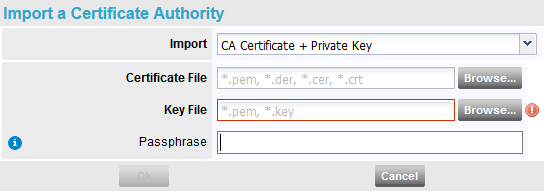
or a CA Certificate + a Private Key: |
If the Proxy CA Private key you import is encrypted with a passphrase,
this passphrase must also be provided to the Appliances belonging to SSL proxy enabled Sites.
|
•
|
or generate a Certificate after defining the following parameters (parameters in bold characters are mandatory, other parameters are optional): |

|
•
|
Passphrase (has to be entered twice, if used): use it
if you want the Proxy CA Private key to be encrypted with a passphrase, to
raise the security level of SSL Optimization. |
|
•
|
Organizational Unit (OU) |
|
•
|
Click the Generate self-signed CA button to generate the certificate which is immediately displayed: |

or
|
•
|
Click the Generate CA Request (CSR) button to generate a certificate request which needs to be sent and signed by a Certification Authority. The system automatically asks you to save the file. Hit OK to confirm. |

The proxy CA certificates must be in your workstation
trust-store.